Visual effects in Live Studio: blurred background, filters, appearance and makeup
The Effects tab applies effects to your camera before going on air: blur or replace the background, color filters, appearance retouching (brighten, smooth, brighten eyes) and makeup. Only in Chrome, Edge and Safari 17+.

The effects run in your browser, on your camera, and go straight to the broadcast — the preview, the guests and the networks see the result. No virtual camera software is needed.
Where it is: Live Studio › Effects tab.
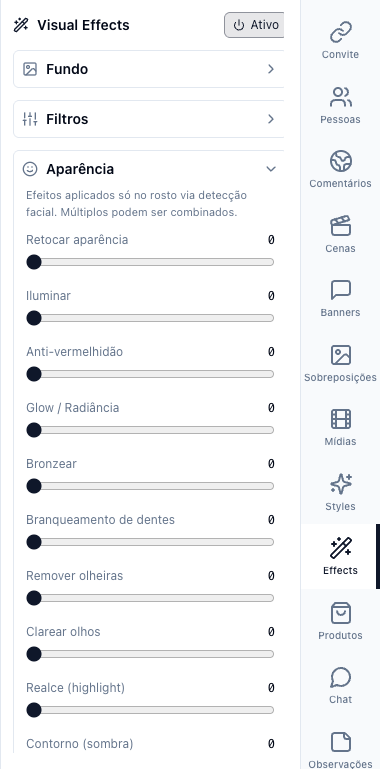
The numbers in parentheses refer to the image.
Turn on
Turn on the Active switch. With the camera connected, the canvas starts showing the effect. Effects require Chrome, Edge or Safari 17+; in another browser the tab says they are not available.
The sections
- Background — blur the background (with intensity) or replace it with a color, gradient or image. It works best with front light and a simple background. When the Appearance section is active, background effects pause (a browser limit: one effect at a time on the face and the background).
- Filters — brightness, contrast, sharpness, color temperature: fine adjustment of the camera image.
- Appearance — retouching by face detection, combinable: smooth skin, brighten, anti-redness, glow, tan, whiten teeth, remove dark circles, brighten eyes, highlight and contour. Each with a 0 to 100 slider.
- Makeup and Face paint — lipstick, blush, eyeliner and paintings, over the face.
Reset all goes back to natural. The settings are kept for the next live.
Cost for the computer
Effects use your computer's processor and graphics card. If the live starts stuttering or the fan spins up, turn off the background blur first (it is the heaviest) or lower the broadcast quality to 720p.