Which radio link to use: universal (HTTPS) or direct
The radio has a universal link, which works on any website, app, TuneIn and Alexa, and direct links to the server. Learn which one to use in each case and where to copy them.
Your radio has more than one listening address, and the difference between them decides whether the player will play or not. When in doubt, use the universal link: it was made to work everywhere.
Where it is: Applications › your radio › Home (Connection Information block) and Links & Widgets.
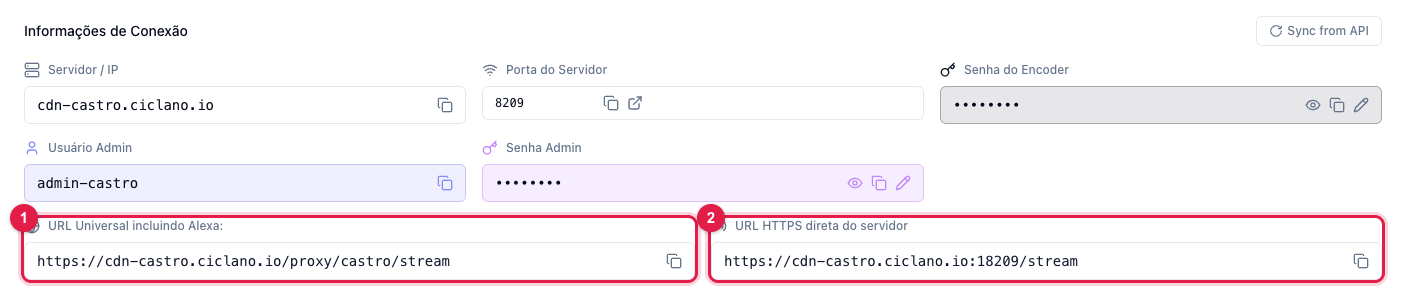
The numbers in parentheses refer to the image.
The universal link (1)
It has the form https://cdn-yourradio.ciclano.io/proxy/name/stream. It goes out on the standard web port (443), over HTTPS, so:
- it works on an HTTPS website with no "mixed content" warning;
- it gets through company, school and carrier networks that block non-standard ports;
- it is accepted by TuneIn, radio apps and Alexa — your radio's skill uses exactly this link.
It is the link to put on your website, in the Web Player, in apps and in any radio directory.
The direct link (2)
It points straight to the streaming server, on its own port: https://cdn-yourradio.ciclano.io:port/stream. There is also the HTTP version (without the "s"), on the Links & Widgets page. Use it when a program or device asks for the server's "raw" address, or to diagnose: if the direct link plays and the universal one does not, the problem is between the proxy and the listener; if neither plays, the problem is the radio (encoder or port). Some old devices only understand the HTTP link.
All the links in one place
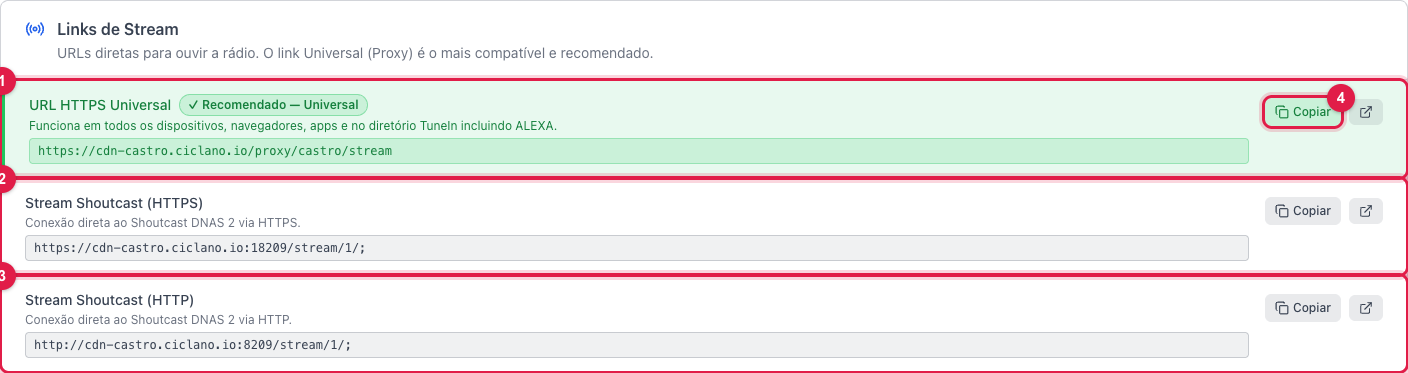
The Links & Widgets page lists all three (1, 2, 3) with a Copy button (4) and one to open in a new tab. Further down are the links for TuneIn and players (.pls, .m3u, .asx), the stream information and the widgets for the website.
What to do if…
- On my website the player does not play. If the site is HTTPS, the link must be HTTPS: use the universal one (1).
- Alexa cannot find the radio. The skill uses the universal link; check that the radio is on air by opening the link itself in the browser.
- It plays on the phone but not on the kitchen internet radio. Old devices sometimes only play the HTTP link (3).