How to give panel access to an announcer or partner without sharing your password (subaccounts)
Register the person as a contact, enable them as a subaccount and they receive an invitation by e-mail. On accepting, they sign in with their own login and see only the areas you allowed. No password sharing.
Never share your panel password with someone else. The right way to give access to an announcer, a partner or whoever runs the schedule is the subaccount: the person receives an invitation, creates their own password and enters your account with the permissions you choose. You can remove the access at any time, without changing anything on your side.
Where it is: menu under your name › My Profile › Subaccounts tab.
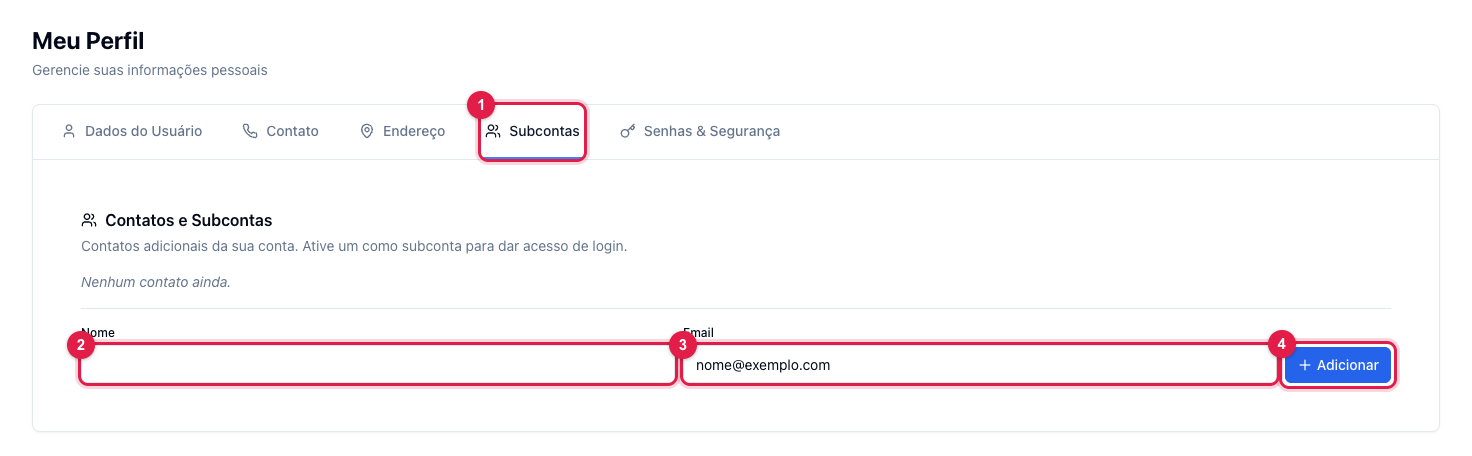
The numbers in parentheses refer to the image.
1. Register the contact
- In My Profile, open Subaccounts (1).
- Enter the person's name (2) and e-mail (3) and click Add (4). They enter the account's contact list.
2. Enable as a subaccount
- On the contact's row, enable the subaccount option and choose the areas they can access (for example, only AutoDJ and Program Schedule, without billing).
- The person receives an invitation by e-mail. Until they accept, the access stays pending — nothing is released.
3. The person accepts
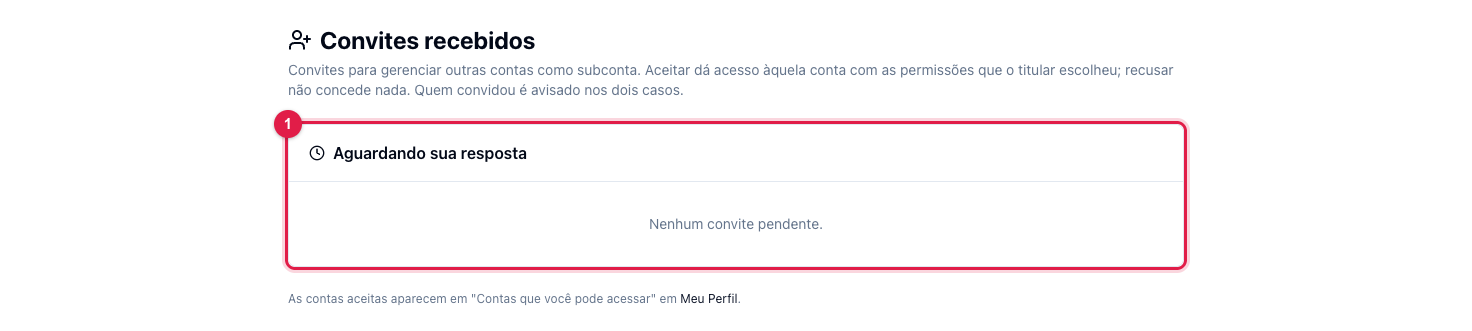
Whoever was invited signs in to the panel with their own e-mail (if they do not have an account yet, they create one through the invitation link) and opens Received invitations, in the menu under their name. There they accept (1) or decline. Accepting, your account starts showing for them in "Accounts you can access", in the profile, and they enter your account with the view of the allowed areas.
Rules
- The subaccount never sees your password and cannot change it.
- You limit by areas; what was not allowed does not even show in their menu.
- To remove the access, disable the subaccount in the same tab: the access drops right away.
- A person can be a subaccount of several accounts and chooses which one to enter through the Accounts menu.
What to do if…
- The invitation did not arrive. Check the typed e-mail and the spam folder. Registering the e-mail does not create an account or change anyone's password; only the invitation releases anything.
- The person signed in and does not see AutoDJ. The area still needs to be allowed in the subaccount's registration.