How to stream live to Facebook (page, profile or group)
Connect the account in Destinations › Facebook › Add Account, choose between the timeline, the pages and the groups, mark and start the broadcast. See what changes in profile and group comments and how to fix expired access.
On Facebook the live can go to your timeline (profile), to a page you manage or to a group. Ciclano creates the live there and relays the video from your encoder.
Where it is: Applications › your video application › Destinations › Facebook card.
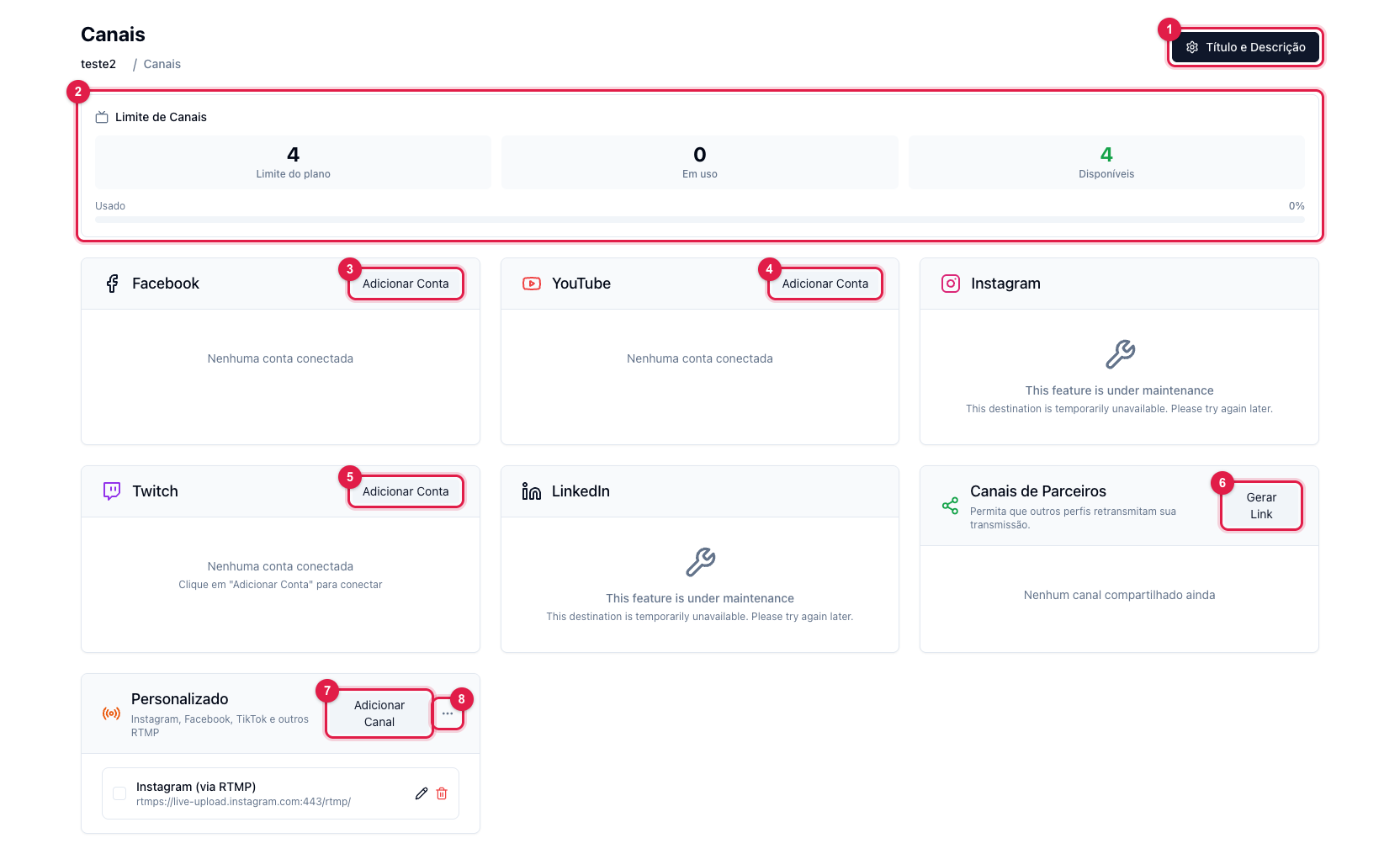
The numbers in parentheses refer to the image.
1. Connect
- Click Add Account (3) and sign in to Facebook. Grant the requested permissions — including those for pages and groups, or they will not show.
- The card lists the account with three blocks: Timeline, Pages and Groups. Mark where the live goes (it can be more than one; each counts toward the plan limit). The Select all and Deselect all buttons help when there are many pages.
2. Title and description
Facebook uses the title and description from Title and Description (1). Set them before starting.
3. Go on air
On the Home screen, Start Transmission and the encoder. Facebook usually shows the live in under a minute. When done, stop the encoder and click Stop Transmission: the live is ended and stays published as a video.
Comments: profile, page and group
- Page — comments reach the panel with the commenter's name and photo. It is the best option for interacting.
- Profile (timeline) — Facebook delivers the comments without name and photo, due to personal profile privacy rules.
- Group — Facebook does not expose comments of lives in groups; they do not show in the panel.
See Live comments: how to read and reply in the panel.
Common problems
- Page does not show in the list: you are not an admin of it, or you denied the pages permission when authorizing. Log out of the account in the card and connect again accepting everything.
- Access revoked or expired: Facebook drops the access when you change your password or after a while. Logs › Channels shows "access revoked" or "token expired". Log out and connect again, and mark the destination once more.
- The live does not show in the group: the group must have Ciclano as an allowed app (group settings › Apps) and you must be an admin.