Which playlist type to use in AutoDJ: General, Scheduled, Interval, Once and Time announcement
General, Scheduled, Interval, Once and Time announcement: what each type does, when to use it and a table to choose quickly.
In AutoDJ, a playlist is not just a list of songs: the type says when it plays. Choosing the right type is what makes the schedule work without you pressing buttons.
Where it is: Applications › your radio › AutoDJ › Playlists.
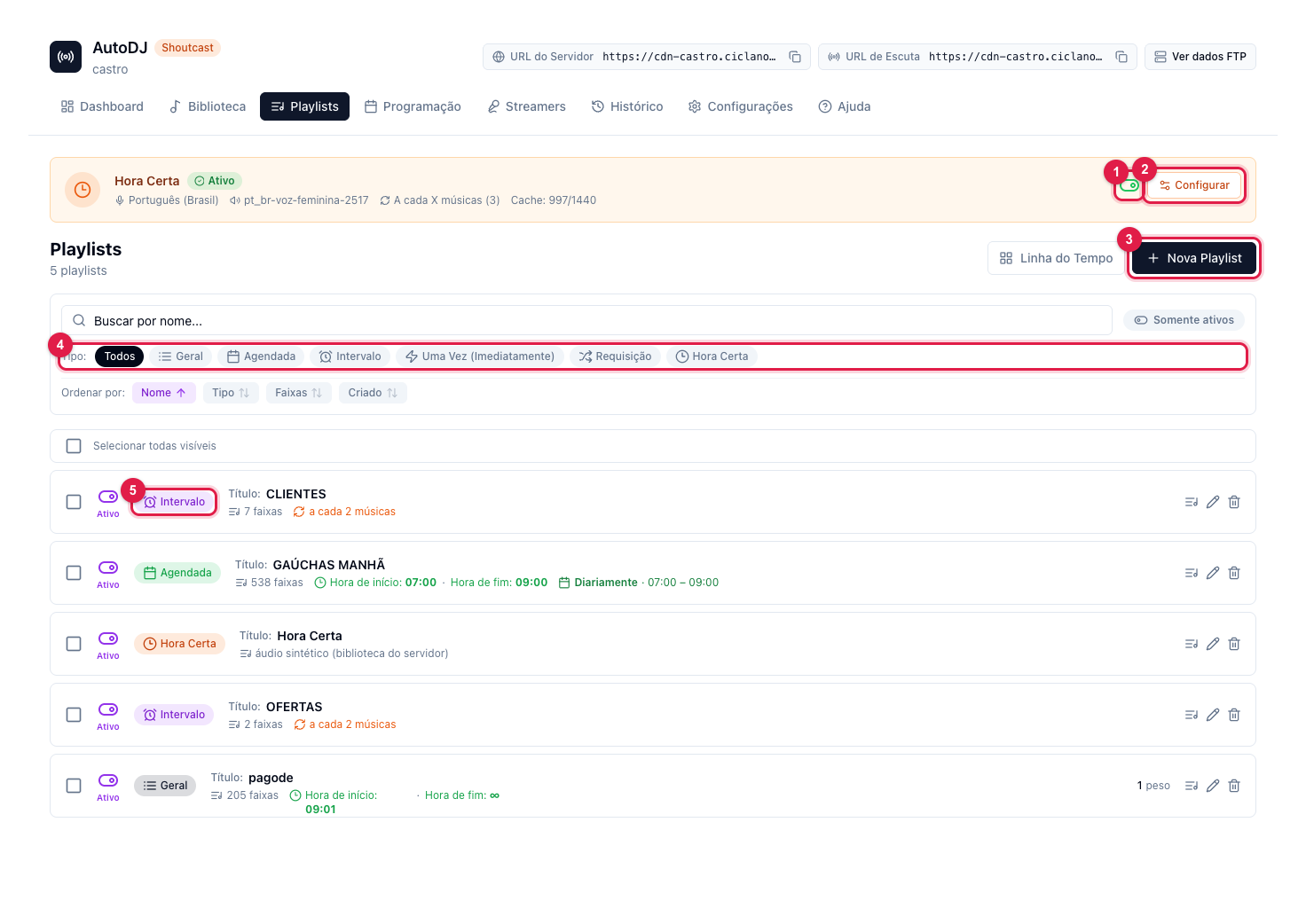
The numbers in parentheses refer to the image.
The types, in a table
| Type | When it plays | Use it for |
|---|---|---|
| General | All the time, when no other is due. | The radio's music. Most stations need just one, with all the songs. |
| Scheduled | On the day and time you set (weekly, daily, monthly, yearly or once). | Fixed-time shows: the morning show, Sunday gospel hour, the Friday night country block. |
| Interval | Every X songs or X minutes. | Commercials, jingles, spots and institutional notices. |
| Once (Immediately) | Now, once, and stops. | Urgent notice, a special that has to go in right away. |
| Time announcement | On the hour, or every X songs/minutes. | The clock announcement with a synthesized voice. We create it; you only turn it on (1) and configure it (2). |
In the list, the colored label next to the name (5) is the type. The Type filter (4) shows only one type at a time. Every new playlist starts in New Playlist (3), where the type is chosen.
Order of priority
When a track ends, AutoDJ looks in this order: Time announcement → Once → Scheduled → Interval → General. That is why the commercial "cuts into" General, the scheduled show "cuts into" the commercial, and the time announcement comes on top of everything.
General — the main rotation
- Weight (1 to 10): only matters when there is more than one General. It sets how often each one is drawn. A radio with a single General playlist can ignore it.
- Rotation order: Random without repetition is the safest — it plays every track before repeating any. Sequential plays in list order. Pure Random may repeat.
- Active Time Window: optional. Empty, the playlist is always available. If you use windows on all Generals, leave one without a window as a safety net — otherwise, in the uncovered hours, the engine picks any General ignoring the time.
Step by step in How to create a playlist in AutoDJ and add songs.
Scheduled — the show with a set time
It takes the air at the configured time and gives it back to General when it ends. A playlist can have several schedules (Monday at 7 and Saturday at 9, for example). It has no weight or window: the schedule is the window. Step by step in How to schedule a show on the radio.
Interval — commercials and jingles
It fires on a single rule: every X songs or every X minutes. On firing, it either plays one track from the playlist (a jingle between songs) or plays all tracks in order as a commercial break. Step by step in How to add commercials and jingles to the radio.
Once (Immediately)
Plays the whole playlist once, starting now (or after the current song, if you check it), and stops. To play it again, save the playlist once more. Step by step in How to play an announcement right now in AutoDJ.
Time announcement
A system playlist: it cannot be deleted or receive tracks — the audio is generated on the server from the voice you choose. Configure language, voice, trigger and whether it interrupts the song. Step by step in How to enable the time announcement on the radio.
About the rotation order
Pure Random only exists in General and Once playlists. Interval, Scheduled and Time announcement always use Random without repetition (otherwise a jingle would repeat before the others played), and the commercial break always plays in sequence, from the first track to the last.